
Articles / Paid media
How Google Ads and Meta Ads work better together
And how to split budget between them
On this page
Talk through your budget split
We will look at how your Google and Meta budgets are split and where the two platforms overlap.
Google Ads vs Meta Ads
When comparing Google Ads and Meta Ads, the goal is not to pick a winner, but to decide how to split your budget effectively. This makes it a paid media strategy question rather than a platform choice.
Judging Google Ads and Meta Ads on a single metric, such as CPA or ROAS, shows which platform gets credit for conversions, not which one drives total revenue.
If Meta shows a low immediate return, it is tempting to cut its budget. However, if brand searches drop weeks later, Google Ads becomes far more expensive, showing how the two platforms depend on each other.
Three jobs, not two platforms
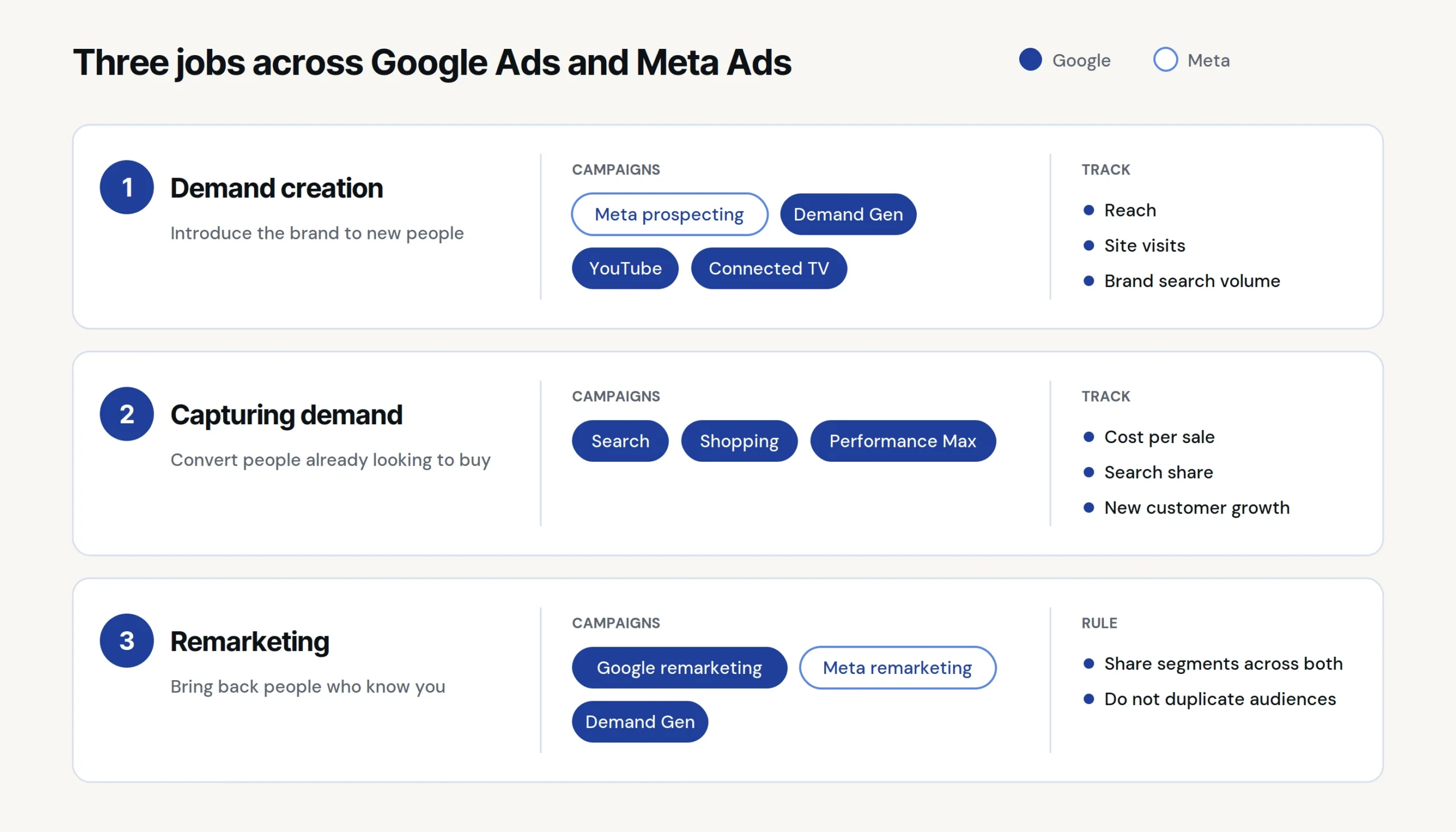
Rather than sorting budgets by platform, organise them by objective. Both Google and Meta can support three distinct roles across the funnel, each with different costs and strengths. Categorising campaigns into these three roles prevents overlap and gives you full-funnel coverage. Effective multi-channel advertising matches budget to customer intent.
1. Demand creation
Demand creation introduces your brand to new audiences and builds interest. Track the success of these campaigns using reach, site visits and brand search volume.
Choose your demand creation platform based on your team’s strengths and marketing budget.
Meta offers a fast, cost-effective space to test messages with rapid feedback from broad audiences. A solid Meta Ads strategy relies on strong creative assets and constant iteration, so if your team is good at producing high-quality images and ad copy, Meta is a strong fit for building demand.
Google Demand Gen reaches active browsers across Google properties. Placements on YouTube offer broad, cost-effective reach similar to social media, using visual formats that tell a clear story to build interest. Connected TV options, including shoppable video feeds, reach people directly on television screens. If your team is good at video storytelling and can provide clean images without text overlays for non-YouTube placements, consider Google Demand Gen for reach.
2. Capturing demand
Capturing demand converts existing customer interest into direct sales. Google Search, Shopping and Performance Max target active searchers, supported by retargeting. Track success using cost per sale, search share and new customer growth. While these metrics look best on immediate sales reports, relying only on standard search in your Google Ads strategy misses earlier chances to generate demand.
3. Remarketing
Remarketing re-engages familiar users using tailored segments across both channels.
Remarketing is where the two platforms genuinely complement each other, provided the segmentation is shared rather than duplicated. A workable ecommerce split:
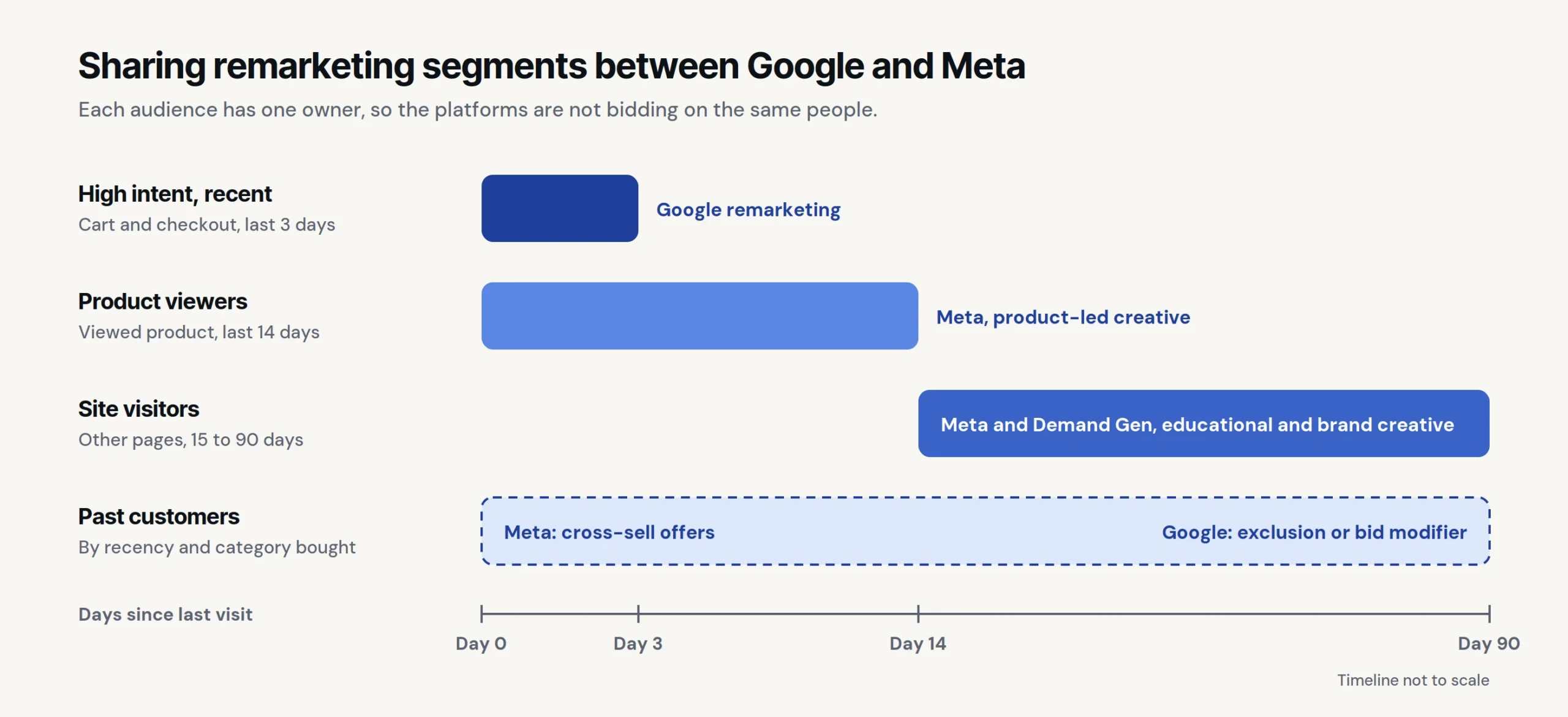
- High intent, recent. Cart and checkout abandoners in the last three days, carried by Google remarketing, because the person is close to a decision.
- Product viewers, medium window. Product page viewed in the last 14 days without adding to cart, carried by Meta with product-led creative at a lower cost per impression.
- Site visitors, long window. Non-product visitors and content readers, 15 to 90 days. Meta and Demand Gen, with educational and brand creatives.
- Past customers. Segmented by recency and category purchased, for cross-sell on Meta and as an exclusion or bid modifier on Google.
How to split budget between Google Ads and Meta Ads
There is no single correct ratio for dividing media budgets. Instead, follow a simple process: start by capturing users who are already looking to buy.
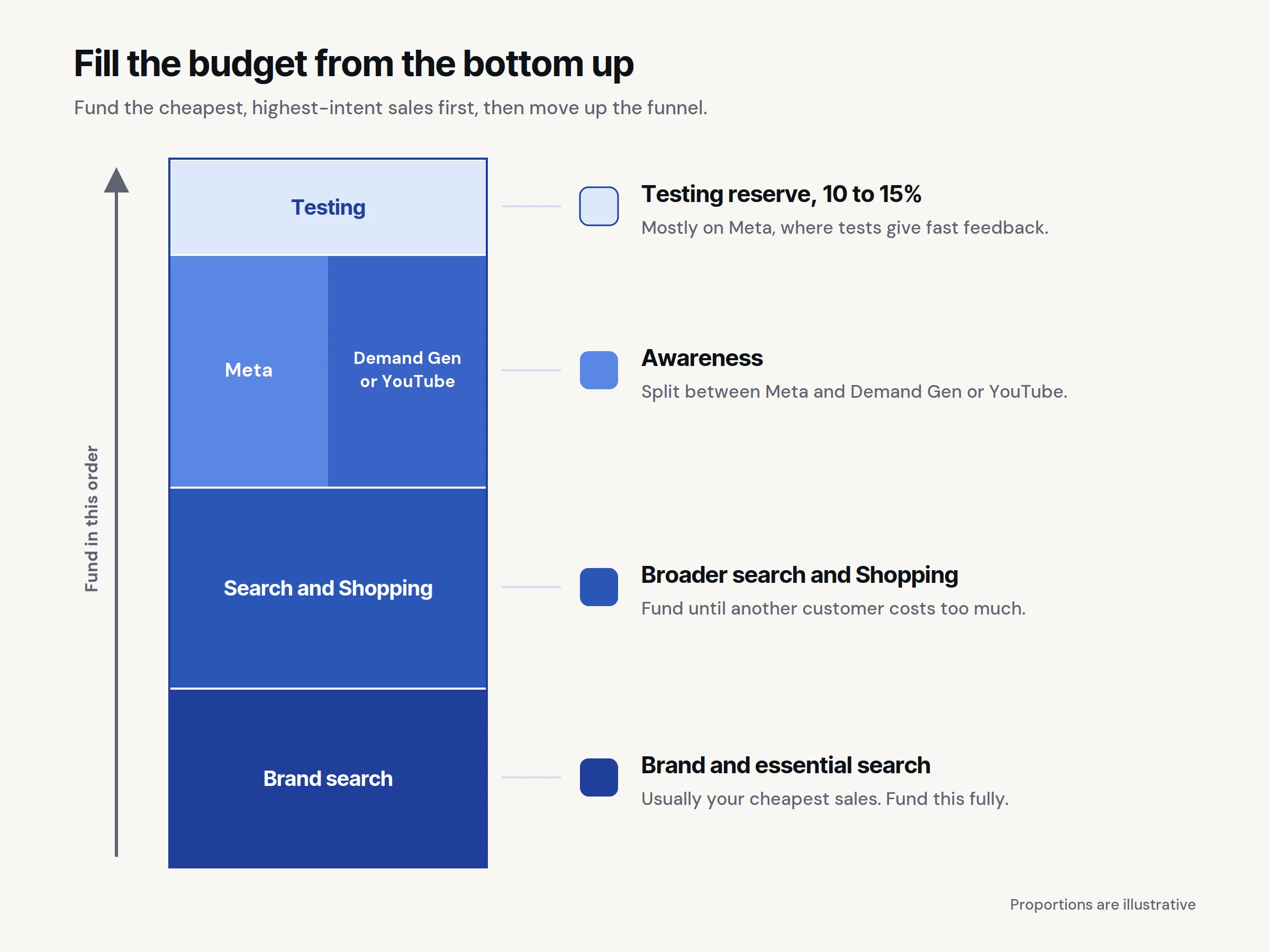
- Fully fund high-intent searches first. Put money toward your brand name and essential search terms first. This is usually your cheapest source of sales, and underfunding it leaves easy revenue on the table.
- Fund broader searches until returns drop. Spend on general search terms and Shopping ads up to the point where getting another customer becomes too expensive.
- Use the remaining budget to build awareness. Any money left over should go higher up the funnel to introduce your brand to new people. Split this extra spend between Meta and Google Demand Gen or YouTube rather than relying on just one.
- Base budget shifts on real data. If you are new to top-of-funnel Google campaigns, allocate most of your initial awareness budget to Meta. Allow Google enough time and budget to deliver clear insights, then reallocate funds based on overall brand growth and revenue gains rather than platform-specific reports.
- Reserve 10 to 15% for testing. Meta is ideal for rapid testing because it reaches many people quickly. Use what you learn here to guide your broader omnichannel advertising plan.
- Review performance regularly. Check your budget split monthly or quarterly against your total customer acquisition cost and new buyer revenue, rather than relying solely on platform dashboard numbers.
A decision framework for adjusting the split
| Signal you observe | What it usually means | Budget response |
|---|---|---|
| Search market share is high, but cost per sale is rising | You have maxed out direct search demand. | Move extra budget upstream to Meta prospecting and Google Demand Gen. |
| Brand search volume is flat or falling | Not enough people are discovering your brand. | Increase Meta prospecting, add Google Demand Gen or YouTube, and avoid budget cuts here. |
| Meta ads show high frequency to a small group | The targeted audience is too small, rather than an issue with ad creative. | Expand audience targeting or add new creative assets without increasing budget. |
| Overall acquisition cost rises while platforms report stable costs | Both platforms are claiming credit for the same buyers. | Exclude overlapping audiences before reallocating the budget. |
| Strong returns only on Meta retargeting | Meta is capturing existing interest rather than reaching new audiences. | Shift budget from retargeting to prospecting campaigns. |
| New customer share is falling while revenue stays flat | Most sales are coming from repeat buyers. | Increase top-of-funnel prospecting on both platforms. |
| Demand Gen or YouTube gets clicks, but no increase in brand searches | The ad content is not leaving an impression, or tracking is set up incorrectly. | Fix tracking before changing budget. |
Attribution and measuring incremental value across platforms
Running both platforms at the same time often creates conversion tracking challenges:
- Double counting. Both platforms often claim credit for the exact same sale, making total reported sales look far higher than your actual revenue.
- Inconsistent tracking windows. Platforms count conversions using different timeframes and rules, making direct comparisons misleading.
- Brand awareness isn’t captured by final-click reports. The ad that introduced a customer to your brand often gets no credit in basic reports, leading companies to cut top-of-funnel funding too early.
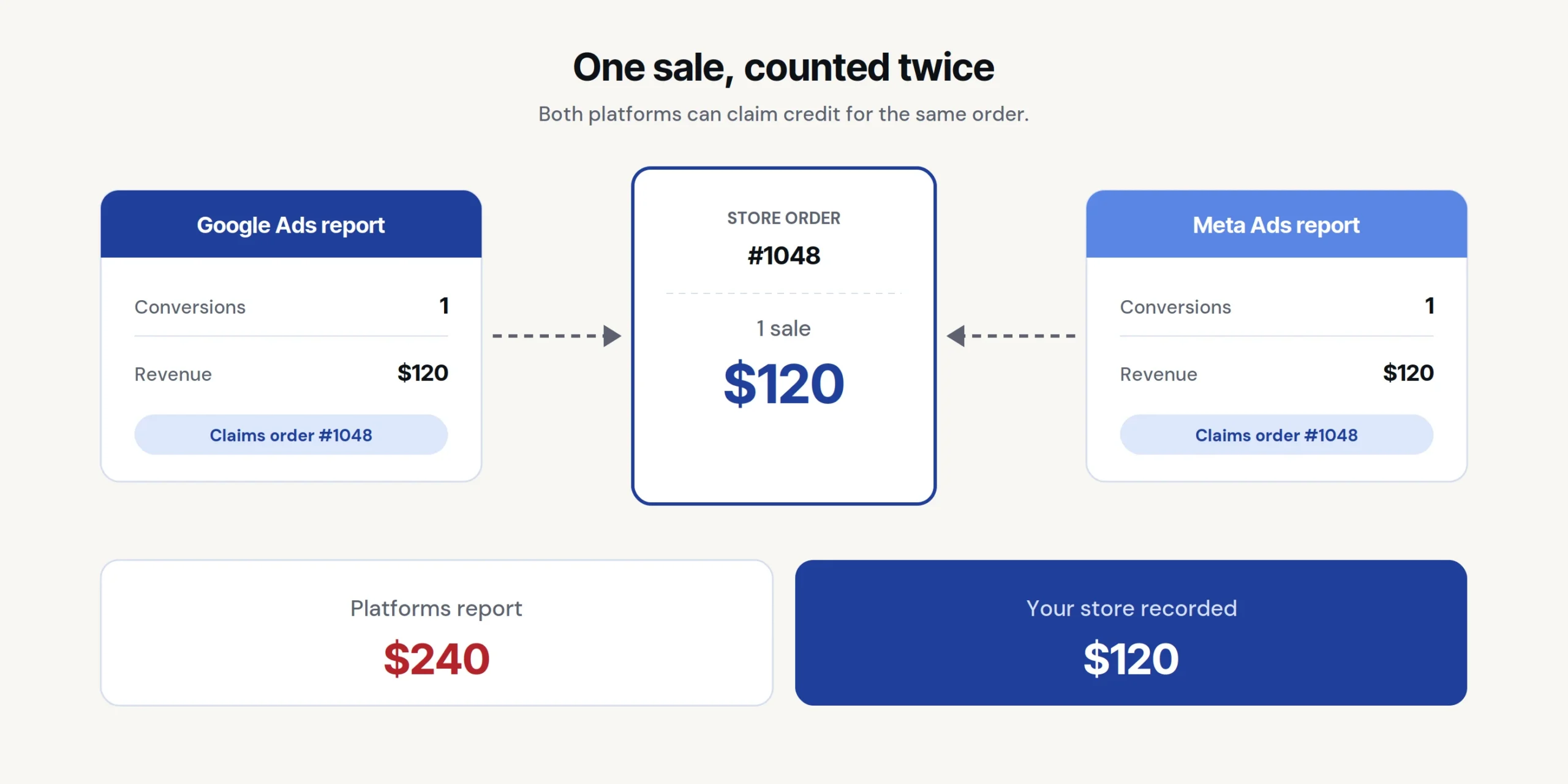
This means your paid media needs a reliable data setup: consistent conversion metrics, server-side tracking and deduplicated event data. Getting your tracking and reporting infrastructure right gives you reliable decisions, especially if you are selling across multiple markets.
Tracking Google Ads and Meta Ads together
Looking at two separate monthly reports usually leads to separate debates, and the channel with lower direct sales always looks worse. A single combined report gives a clearer picture by focusing on four key questions: total spend versus actual earnings; how many sales came from new customers; how early customer interest (like reach, direct site visits and brand searches) is growing before sales happen; and what your ad creative tests revealed.
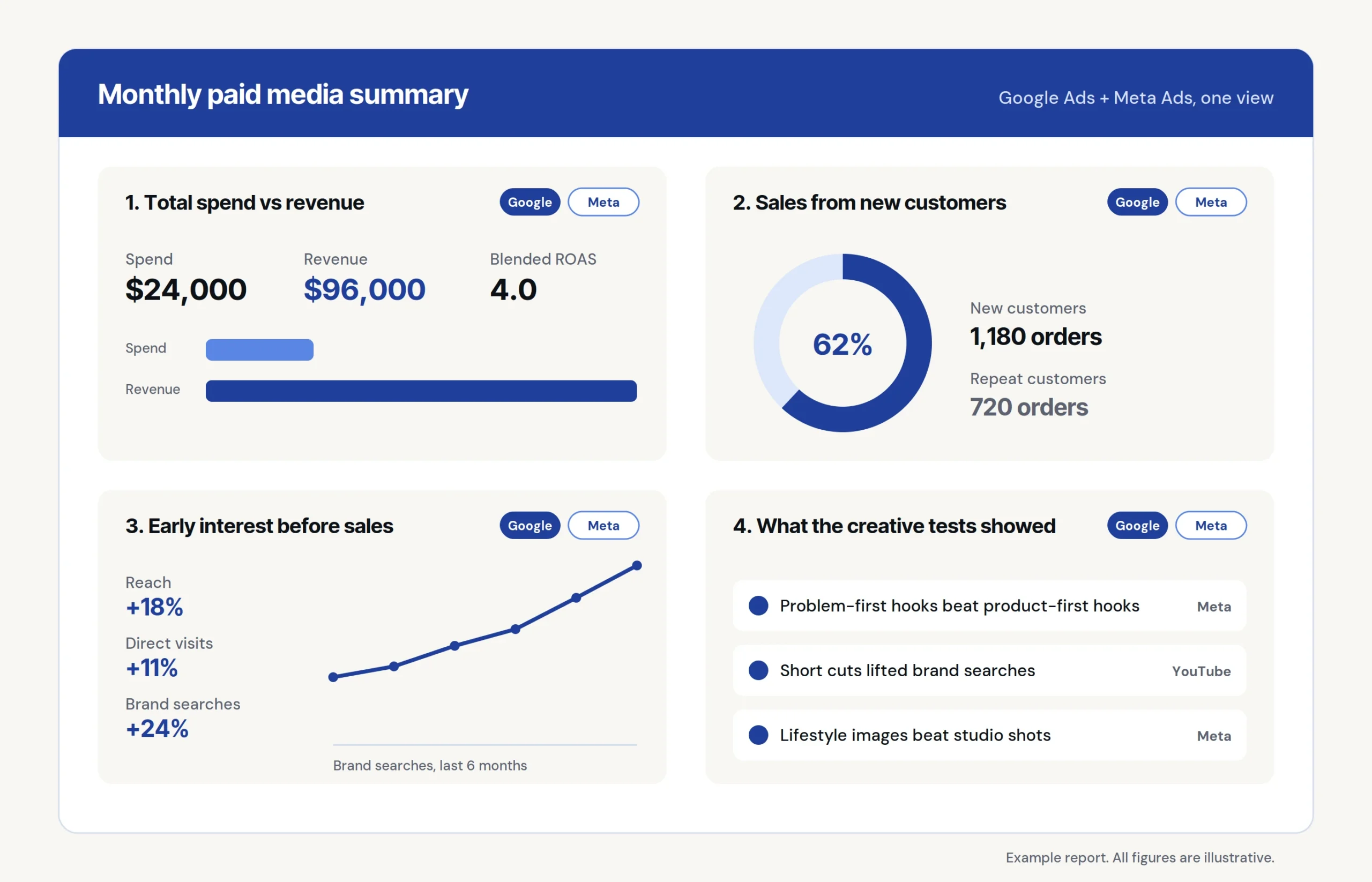
Detailed channel breakdowns can be saved for account managers rather than the main summary. Viewing performance this way helps you see where the next dollar works hardest. This is what integrated paid media looks like in practice and how growing brands organise their advertising across channels and regions, which forms a major part of enterprise paid media management.
Talk it through with us
If the two reports never quite reconcile, if the budget split is set by whichever channel reports best, or if Google is doing nothing above the search bar, that is worth a conversation.
We work with ecommerce and international growth brands on paid media management across both platforms, tracking that holds up, and reporting that answers a commercial question rather than a platform one. Get in touch if you would like to have a chat.
Not sure your budget split is right?
Send us your current Google and Meta budgets and a recent report from each, and we will tell you where the overlap and the missing demand are. A senior team member will reply within one business day.